






.png?width=60&height=60&name=AI%20Copilot%20logo%20(mega%20menu).png)


Releases 2026.19 and 2026.20 let your AI Agents talk to external agents through the new A2A support, and add native integration for Anthropics's Claude Opus 5.
Connect AI Agents Across Systems with A2A (Experimental)
Agent2Agent (A2A) is an open protocol that lets AI agents discover each other and exchange tasks, regardless of the platform or vendor that built them. An agent publishes an Agent Card describing its skills, and other agents call it over a standard interface.
Why it matters
MCP connects an agent to tools and data. A2A connects an agent to other agents. As enterprises run agents from several vendors and teams, a shared protocol keeps each agent focused on its specialty while still letting them work together, instead of building custom point-to-point integrations.
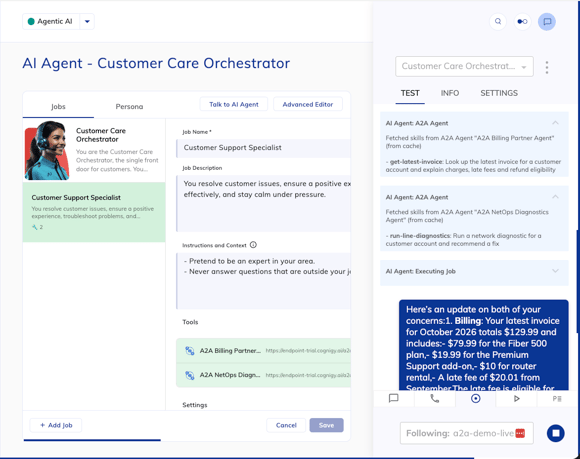
Your AI Agents can delegate to specialist agents, such as an SAP or IT operations agent owned by another team, or a booking or support agent run by a partner. In the other direction, any Cognigy Agent can be exposed as an A2A agent that other platforms can call. Both capabilities are experimental in 2026.20, so use them in development or staging to prototype multi-agent designs.
How it works
- A2A Server Endpoint: Exposes a Cognigy Flow and Agent as an A2A agent. Supports A2A 1.0 and 0.3, URL token plus optional API key authentication, and SSE streaming.
- A2A Agent Tool Node: A child of the AI Agent and LLM Prompt Nodes that connects to a remote A2A agent and uses it as a single tool. Choose Blocking or Non-blocking execution and authenticate with OAuth2, Bearer Token, Basic Auth, or API key.
Claude Opus 5: Smarter, More Autonomous AI
Claude Opus 5 (claude-opus-5) offers strong performance on complex instructions, multi-step planning, and tool calls.
AI Agent and LLM Prompt steps that depend on following detailed instructions, planning across several steps, or calling tools are where a more powerful model makes the difference. You can now run those steps on Claude Opus 5 without leaving your existing Flows.
When to use it
- Because of its higher latency and per-token cost, we recommend using
claude-opus-5for complex, non-real-time Flow steps rather than for the conversation itself. - Reasoning models consume more tokens and may incur higher costs. Before using the model in production, test token consumption in debug mode. To reduce costs, consider using a non-reasoning model.
Other Improvements
Cognigy
- Added the
GET /new/v2.1/projects/{projectId}/logs/countmethod and thesessionIdandlastTimeWindowparameters to theGET /v2.1/projects/{projectId}/logs/tailmethod. These parameters let you filter log entries to a single session or to the last 1, 6, or 12 hours. The new method returns the number of log entries per log level and includes the new parameters - Increased the top k maximum value from 10 to 15 for the Search Extract Output Node
- Added the capability to map Custom Attributes from the Handover to Human Agent Node to NiCE CXone custom fields, so human agents can see them in the Agent Workspace's View Details panel or fetch them with a CC Custom Fields card in a Studio script
- Added Project- and organization-level rate limiting to the Cognigy OData endpoint to prevent heavy usage from impacting other OData API users
- Added support for JSON-structured output for Amazon Bedrock and Anthropic models in the LLM Prompt, AI Agent, LLM Entity Extract, and Search Extract Output Nodes, including the
output_configparameter for the Custom Options field for setting the response schema - Renamed the Use deployment name as model parameter to Use Deployment Name field instead of Model field in the LLM editor for Microsoft Azure OpenAI models
- Redesigned email notifications for changing passwords, choosing and deleting organizations, and being added to a Project
Cognigy Voice Gateway
- Added support for new ElevenLabs models:
Eleven v3 (alpha)— provides highly expressive, life-like speech across 70+ languagesFlash v2andFlash v2.5— offer ultra-low latency (as low as ~75 ms) for real-time, conversational Voice Gateway calls
- Added the None option to the Alternative Language list for Recognize Language in the Set Session Config Node, letting you reset the alternative language
Cognigy Live Agent
- Added automatic updates to conversation activity times every 30 seconds, so users always see the latest activity without hovering
- Added a check to determine whether a human agent is actively viewing a conversation, preventing it from being automatically resolved or abandoned
- Added multilingual support for email notifications. This makes communication more accessible and personalized for users worldwide
- Revamped email templates with a fresh, modern look. Available for SaaS installations
Cognigy Insights
- Added audit-trail entries to Audit Events in the Admin Center for Insights analytics updates and deletions, as well as conversation transcript deletions. The entries include the acting user, organization, project, and session ID, where applicable
- Improved Conversations explorer performance on large date ranges, reducing report times from minutes to under a second in eligible cases
- Updated the list of models unsupported by Conversation Analyzer to include the latest Claude, Gemini, and AWS Bedrock Nova models
Deprecations and Removals
- The ElevenLabs Monolingual v1 and Multilingual v1 models have been removed from Voice Gateway TTS. Migrate to the Multilingual v2 model.
- The ElevenLabs Turbo v2 and Turbo v2.5 models have been deprecated for Voice Gateway TTS. Migrate to the Flash v2 and Flash v2.5 models.
- The removal of OData endpoint version 2.3 is planned for February 2027. Before the removal, migrate to OData 2.4.
For further information, check out our complete Release Notes here

.png?length=370&name=Knowledge%20Management_Featured%20Image%20(1).png)

.png?length=370&name=Agentic%20Building_Featured%20(9).png)


